
eServices
Already signed up for myFE?
Town of Fort Erie Online Payment Services
Access many services online from this page or through our Online Payment Form and myFE portal.
Paymentus provides online payment services for the Town of Fort Erie, allowing secure credit card payments (VISA and MasterCard).
A third-party convenience fee, based on your payment amount, will be shown before you pay. Using this service is optional and you may cancel before payment. The fee is non-refundable and goes directly to the processor, not the Town.
The convenience fee is 1.75% per payment, or $1.95 for parking tickets.
Below is a list of services you can apply for or pay for online.
- Administrative Penalty
- Bay Beach
- Building Permits
- Business Licencing
- EDTS Invoice
- Engineering Permits
- Fire Services
- Parking Tickets
- Planning Department
- Property Tax
- Town Service
- Tree Permits
- Water Billing
Paying Property Taxes
Pre-Authorized Tax Payments Information Due Dates and Payment Options Pay now on myFE
Paying a Water Bill
Water bill frequently asked questions Seniors Utility Relief Fund Pay now on myFE
Booking Ice or Facilities
For rental information or inquires regarding town facilities, please call 905-871-1600 x2431.
Screening Request
A person will have the right, within a limited time, to dispute a ticket by requesting a screening review. The request for screening must be received within 15 calendar days of the date on the penalty notice.
Parking Ticket Screening Request Administrative Penalty Screening Request
Paperless e-bills
Residents of Fort Erie can view property tax and water bills online with convenient paperless e-bills.
Paperless billing means you'll receive statements by email and through our myFE digital portal.
e-Billing is simple, secure, and keeps everything in one place. Access your statements anytime, anywhere, from any device.
To continue receiving paper bills by mail, log into the portal and deselect the "Paperless" option.
Benefits:
e-Billing allows you to view your taxes and water bills conveniently online through a computer, tablet or phone.
- View your bills online
- Download your bills
- Reduce your environmental footprint with no bill printouts or mail deliveries
- Secured information, stored safely behind encrypted password-protected accounts
- Receive an email notification when your bills are ready to view
New customer Sign up (all existing customers will be treated as "new" for the first time)
Instructions for registering as a new user, setting up an account and signing in:
- Visit my.forterie.ca
- To create an account click “Sign up” and add the required information to register
- An email will be sent to you to “Activate your Account” and select a password
- Click the “Confirm E-mail Address” link in the email
- Add your password and click “Complete Registration”
- Enter your email address and password and press “Sign In” to enter the portal
Inside the Portal - Adding you Accounts
When you login to the myFE portal for the first time you will see “No accounts found” under the Account(s) area. To add your water and/or tax account complete the following steps.
- To the far right click “Add”
- Select the type of account from the drop-down menu
- Go to your most recent paper bill, for Tax find Roll No. (15 digits) and Access code, for Water, find Account Number (8 digits) and Access code (see examples below)
- See photos below.
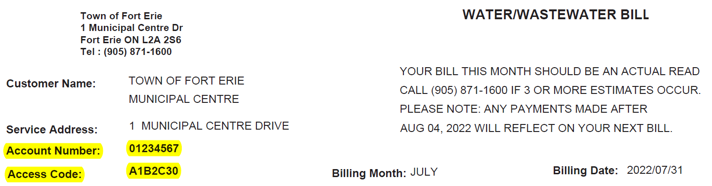

- Click “I confirm” after entering your Account Number and Access Code then click Add
- Once your Water and/or Tax Bills have been added simply click the button to the right that says “Bills” to open previous and current bills as a PDF.
- Clicking the trash can will delete that account from your profile
- “Paperless” billing will be active by default (please see below). To receive a paper bill in the mail please toggle the “Paperless” toggle to OFF (grey).

Once a bill has been added to your “myFE” account you can view and print it anytime at your convenience.
Sign up to our Newsletter
Sign up to receive information from the Town of Fort Erie directly to your inbox. Check out the various categories of general news, and emergency notifications.


